
Steps
-
Go to the Civic Match homepage.
-
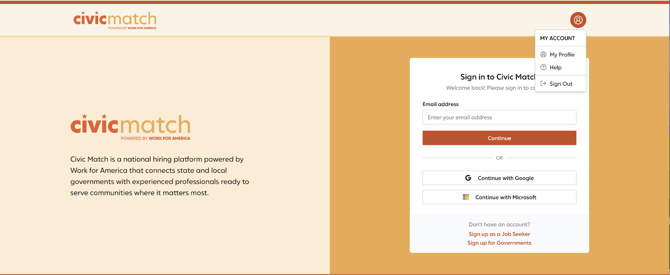
Click sign in to be routed to the Civic Match login page.
- Enter the email address associated with your Civic Match account. Click continue.
- You should receive a verification code to your email. Follow the verification prompts to log in.
- Once logged in, you’ll land on your dashboard.
Tips
- Use the email address, or login method (Google, Microsoft, LinkedIn), you used when you first joined Civic Match.
Troubleshooting
I did not receive a verification code in my email.
Emails may take up to 3 minutes to receive. Confirm your verification email did not go to spam.
I can’t log in. / My login credentials aren’t working.
Enter your email address to receive an emailed verification code to regain access to your account.
I tried to log in, but it says 'Session already exists.' What should I do?
Usually, this means Civic Match was opened in another tab, but was not signed out fully, preventing you from logging in again. Click the Civic Match header at the top left of your screen to be redirected to the dashboard.
Still stuck?
Contact support at support@workforamerica.org for help accessing your account.