
-
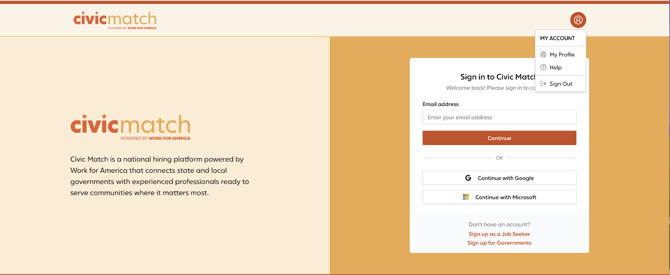
Session already exists = Civic Match was open in another tab already, but was not signed out.
-
If not automatically redirected, click the Civic Match title at the top left hand corner.
-
Another alternative: Click the person/My account icon to navigate to your dashboard.
-
Navigate directly to your dashboard using this link: https://app.civicmatch.org/dashboard
-
-
In the login process, is there a resend verification code button/option for people whose verification codes have expired?
-
Codes come notifications@civicmatch.org. You may need to check your spam folder or whitelist the email address so that the code makes it to your inbox.
-
Codes expire after 30 minutes
-
There is not currently a resend verification button. If their code has expired, they should restart the log in process.
-
-
Alternative: Use the "Continue with Microsoft" or "Continue with Google" options to use your work email to log in. This will redirect them to their homepage and bypasse the need for a verfication code.
-